Configuring Windows Xp for Bangla Print

Configuring Windows Xp for Bangla

<< Go Back to Documentations Section


Step by step instruction:

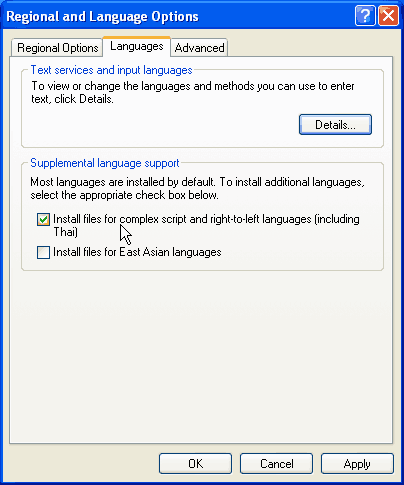
  • Go to Control Panel, Regional and Language Options
  • In the Language tab, select Install files for complex script and right-to-left languages (including Thai)
  • Click Ok.


  • Notes:
    • Keep your Windows Xp CD near at hand. Windows may ask for it in order to copy necessary system files.
    • You may have to restart your computer.
    • it is HIGHLY RECOMMENDED that you will use at least service pack 2 of Windows Xp for using Bangla.


Here is an easier way!

Don't want to bother with Control Panel? Lost your Windows Xp backup? Who says there is no other way out! Click here to download Complex Script Installer...


<< Go Back to Documentations Section

 
< Prev   Next >

Who's Online

We have 75 guests and 1 member online

Our New Members

sourenchattejee 03 Feb 2012
rashedewu196 03 Feb 2012
Matiar 03 Feb 2012
SHull 03 Feb 2012
Shaker ullah 03 Feb 2012

Top Posters in Forum

Administrator 1241
Bangla Bhai 801
uunmatal tarunno 653
WarlorD 588
Omaar.Osmaan 480

Login / Register

User name

Password

Remember me?
Forgotten your password?
No account yet? Create one

Search Site

RSS Feed

Subscribe to OmicronLab RSS!

Subscribe!
(Using a feed reader)


Via Email!

Get updates by mail

Email:

Delivered by FeedBurner

Helper Sites