Configuring Windows 2003 Server for Bangla Print E-mail

Configuring Windows 2003 Server for Bangla

<< Go Back to Documentations Section


Step by step instruction:

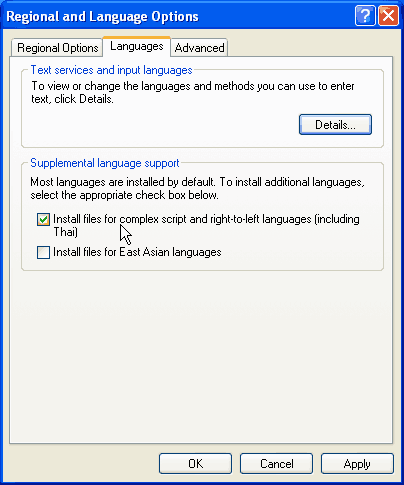
  • Go to Control Panel, Regional and Language Options
  • In the Language tab, select Install files for complex script and right-to-left languages (including Thai)
  • Click Ok.


  • Notes:
    • Keep your Windows 2003 CD near at hand. Windows may ask for it in order to copy necessary system files.
    • You may have to restart your computer.
<< Go Back to Documentations Section

 
< Prev   Next >

Login / Register

User name

Password

Remember me?
Forgotten your password?
No account yet? Create one

Search Site

Helper Sites


RSS Feed

Subscribe to OmicronLab RSS!

Subscribe!
(Using a feed reader)


Via Email!

Get updates by mail

Email:

Delivered by FeedBurner

Visitor Location
